
IQOS TEREA Blog
How to Safely Remove a Broken TEREA Stick Stuck in Your IQOS ILUMA

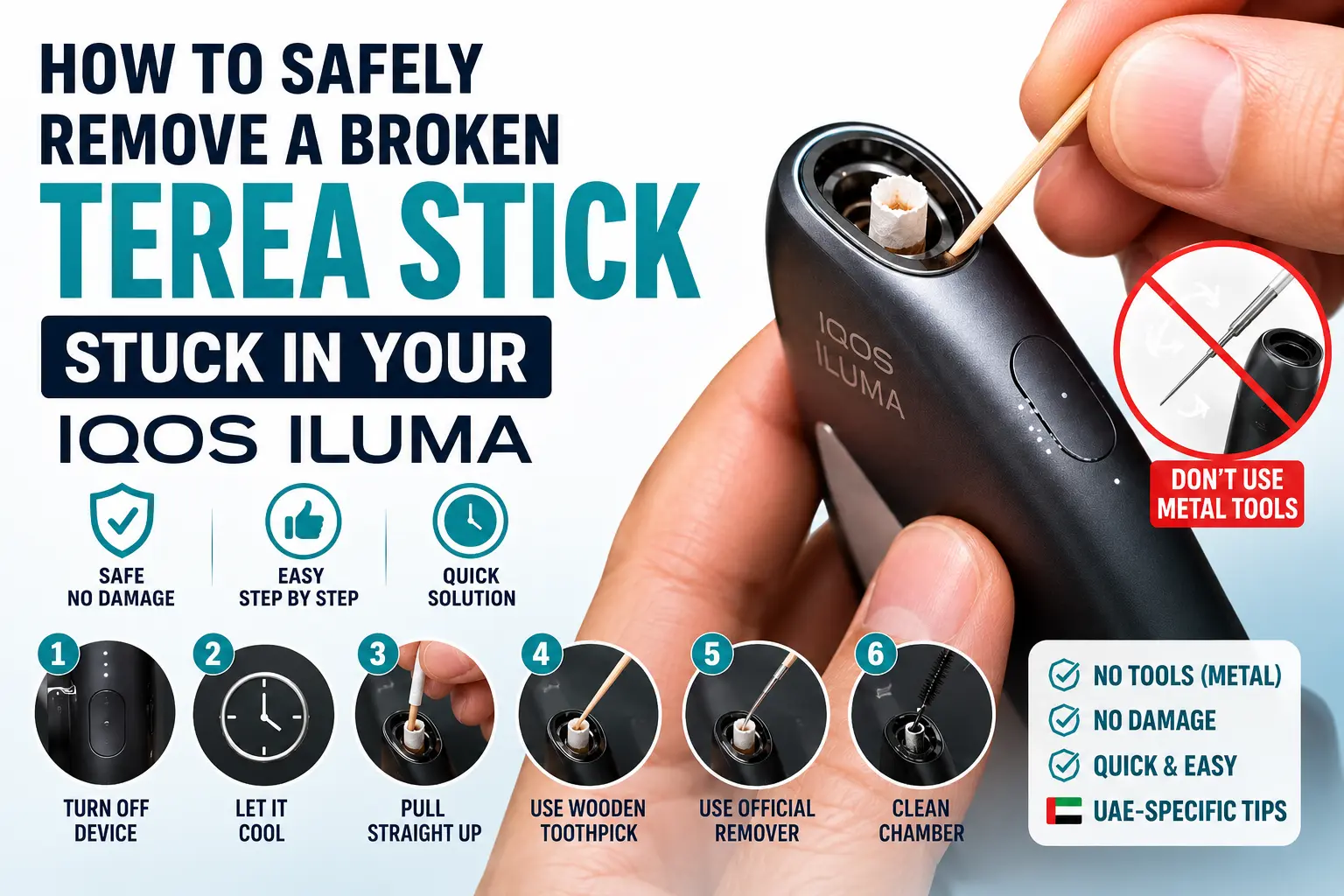
Part of your TEREA stick stayed behind in the holder? Here’s exactly how to remove it safely, without damaging your IQOS ILUMA’s heating chamber.
Turn off your IQOS ILUMA and let it cool down completely before touching the holder. Try pulling the broken piece straight out with clean, dry fingers first.
If that doesn’t work, use a wooden toothpick to gently hook the remaining piece out, or use the official IQOS ILUMA Stick Remover tool if you have one.
Never use metal objects, pins or excessive force — the heating chamber is delicate and metal can scratch or damage it permanently.
Why This Happens So Often
If a piece of your TEREA stick has stayed behind in the holder, you’re not alone — this is one of the most common issues IQOS ILUMA owners run into, and it’s almost always fixable at home in a few minutes. It happens to brand-new users and long-time IQOS owners equally, so there’s no need to worry that something is wrong with your device.
The IQOS ILUMA range works differently from older IQOS devices. Instead of a heating blade, it uses an induction system that heats a metal element built directly into the TEREA stick itself. Because there’s no blade, the stick can’t be sliced or snapped by the device the way older HEETS sticks sometimes could — but it can still break or jam for a few avoidable reasons:
Pulling the stick out at an angle instead of straight up puts uneven pressure on the filter and can tear it.
Twisting while removing (rather than a straight pull) is one of the most common causes of a stick separating mid-holder.
Sticks stored somewhere too dry or too humid can become brittle, making the paper wrapper more likely to tear on removal.
Removing the stick immediately after a session, without letting it settle for a moment, increases the chance of a tear.
Before you do anything: switch your IQOS ILUMA off completely and let it cool down. Never attempt to remove a stuck stick while the device is warm or switched on — this increases the risk of burns and makes the stick harder to grip cleanly.
Step-by-Step: How to Remove a Broken TEREA Stick
Switch off and let it cool
Hold the device’s button for a few seconds to power it off fully, then wait a couple of minutes for the heating chamber to cool down before touching it.
Try a straight, gentle pull with your fingers
If enough of the stick is visible above the holder, grip it firmly and pull it straight up — no twisting, no angling. Often this alone is enough to fully remove it.
Use a wooden toothpick if fingers can’t grip it
If the remaining piece is flush with the holder rim, gently insert a wooden toothpick along the inside edge and carefully hook or nudge the piece upward. Work slowly — don’t jam it straight down into the chamber.
Use the official IQOS ILUMA Stick Remover, if you have one
Insert the hook end into the holder until it touches the top, rotate it roughly 90 degrees, then pull it straight out. This tool is purpose-built for exactly this situation and is the safest method available.
Inspect and clean the chamber
Once the piece is out, look inside the heating chamber for any leftover tobacco debris or paper fragments. Gently clear anything remaining before inserting a fresh stick.
Test with a new stick
Insert a fresh TEREA stick straight down, without angling it, and start a normal session to confirm the device is heating correctly again.
What You Should Never Do
A few actions can turn a simple five-minute fix into an expensive repair, so it’s worth being clear on what to avoid:
- Never use metal objects — pins, needles, tweezers or paperclips can scratch the internal heating element and permanently affect performance.
- Don’t force it — if the piece won’t budge with gentle pressure, stop and try a different method rather than pushing harder.
- Don’t remove the holder ring while trying to extract a stick — this can expose or scratch the heating chamber unnecessarily.
- Don’t attempt removal while the device is warm — always let it cool fully first, both for safety and for an easier, cleaner extraction.
How to Prevent It Happening Again
Once your device is working normally again, a couple of small habit changes make a real difference:
- Always insert and remove TEREA sticks in a straight, vertical motion — never at an angle.
- Avoid twisting the stick when pulling it out, even if it feels slightly stuck at first.
- Store TEREA sticks in a cool, dry place away from direct sunlight to keep the paper wrapper from becoming brittle.
- Give the stick a moment to cool after a session before removing it, rather than pulling it out immediately.
When to Contact Support Instead
If you’ve tried the steps above and the piece still won’t come out, or if you notice damage inside the heating chamber itself, it’s best to stop and get help rather than risk further damage. Our IQOS ILUMA repair and replacement service can take a look and resolve it properly. For general device issues beyond a stuck stick, our full IQOS ILUMA troubleshooting and reset guide covers other common problems.
Keep a Fresh Supply of TEREA on Hand
While you’re checking your device, it’s worth topping up your stick supply so a broken one doesn’t leave you without a fresh pack. Browse IQOS TEREA flavors for same-day delivery in Dubai and fast coverage across the UAE — see our delivery page for details. If you’re still using an older device, our IQOS HEETS Dubai range is also in stock.
Frequently Asked Questions
Why does a TEREA stick break inside the IQOS ILUMA?
TEREA sticks most often break when they’re removed at an angle or with a twisting motion instead of a straight pull. Brittle sticks from poor storage can also tear more easily.
How do I remove a broken TEREA stick from IQOS ILUMA?
Switch the device off, let it cool, then gently pull the piece straight out with your fingers. If that fails, use a wooden toothpick or the official IQOS ILUMA Stick Remover tool.
Can I use tweezers or a pin to remove a stuck TEREA stick?
No — metal objects like tweezers, pins or paperclips should never be used. They can scratch and permanently damage the heating chamber.
Is it safe to remove a broken stick myself?
Yes, as long as the device is switched off and cooled down first. Use only your fingers, a wooden toothpick, or the official stick remover tool.
What if the broken TEREA stick still won’t come out?
Stop trying and contact IQOS ILUMA repair support instead of forcing it. Continued force risks permanent damage to the heating chamber.
How can I stop TEREA sticks from breaking in the future?
Always insert and remove sticks in a straight vertical motion without twisting. Storing sticks in a cool, dry place also helps prevent brittleness.